PlatformConsole
The console, one screen per app.
What is live, the address it answers on, where it came from and every deploy it has had. Your coding agent does the work. The console is where you check it, and where the few things only you should do live.
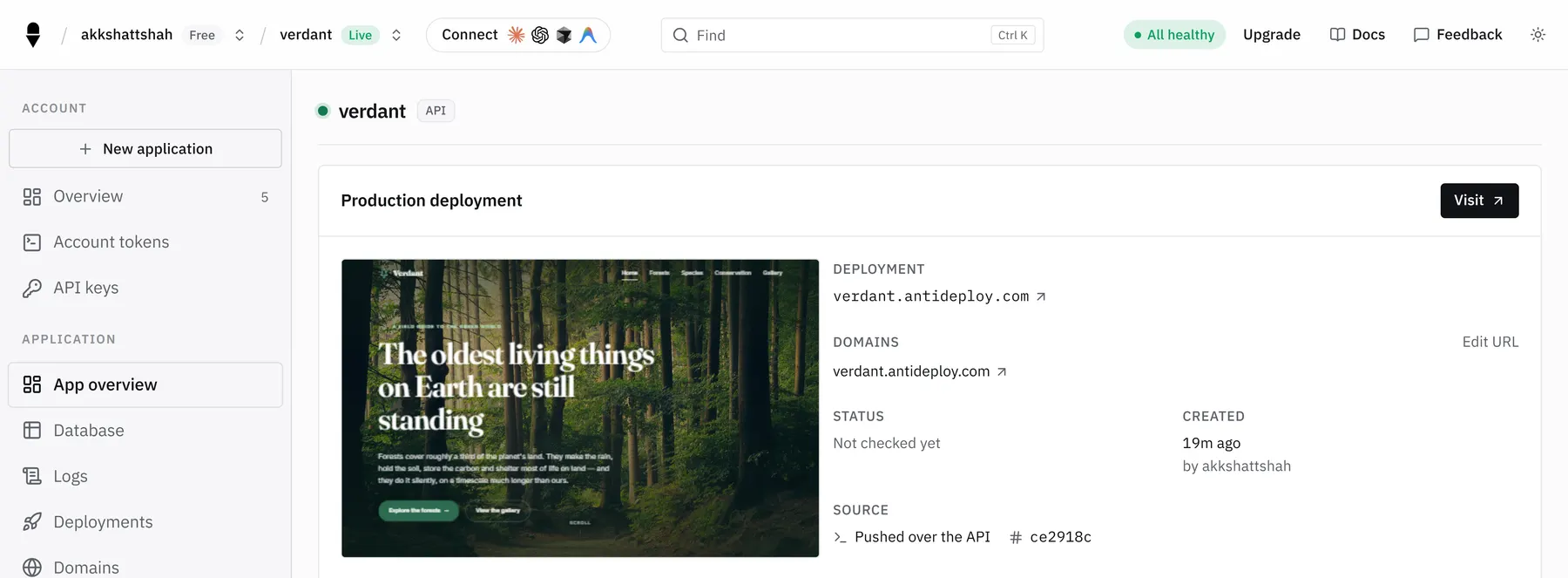
- One screen per appPreview, address, source and deploys together
- Failures in wordsWhy a deploy failed, in a sentence you can act on
- Your data, read-onlyTables, columns and row counts without installing a client
- Your decisions stay yoursDeleting, domains and wallet money are done here
01How it works
Open an app. Everything is there.
There is no cloud console to learn. An app has one page, and the page has a handful of tabs.
One page per app, six tabs.
The Overview shows what is live, its address and where its code came from, with the latest deploys beside it and a way back to the last good version. The other tabs are where the rest of the platform shows up for that app.
- A never-deployed app is visible too, with a button to create its database
- A failed deploy shows its reason in a sentence, and a fix-it prompt for your agent
- Drop a folder or a .zip to deploy, or connect GitHub, from the same page
Overview       what is live, its address, where it came from
Database       tables, columns and row counts, read-only
Logs           what the app printed
Deployments    every deploy, why a failed one failed, rollback
Domains        attach your own domain
Settings       variables, deploy on push, keys, schedules
What only you can do here.
Your coding agent can do almost everything through the API. A few actions are kept in your browser on purpose, because they are irreversible or they spend your money. Approving your agent is one click on a link it shows you, and you can revoke that access at any time.
- An agent can never delete an application or drop a database by mistake
- An agent can never spend your money: you top up the AI wallet yourself
- You can revoke the access you gave an agent at any time
Your agent can                    Only you can, here
deploy, redeploy, roll back       delete an application
set variables, read logs          drop a database
create a database, a bucket,      add a custom domain
  sign-in or email                add money to the AI wallet
create AI keys, schedule jobs,    revoke your agent's access
run security scans02What you get
Everything you need to see, nothing to configure.
The console shows the product as it runs today, and the same facts your agent reads through the API.
-
Every app, one screen. A preview of the deployed site, the address it answers on, where it came from and every deploy it has had. Apps that have never been deployed show up too.
-
Why a deploy failed, in words. A failed deploy says why in a sentence you can act on, and offers a prompt you can hand to your agent to fix it.
-
Back to the last good version. If a release goes wrong, roll back from the app's page. It is built again from its source, so it takes as long as a deploy.
-
Your data, read-only. The Database tab lists tables, columns and row counts without a client, and never writes.
-
An Email section. One place for the account's email: overview, activity, deliverability, sending domain, API key and settings.
-
Security, keys and access. Run a full security scan, create and revoke AI keys, top up the AI wallet, and see and revoke the access you gave your coding agents.
03Reference
Where things are.
The places you will use, and what each is for.
| Place | What it is for |
|---|---|
| Applications | Every app you own, and a button to start a new one. |
| An app's Overview | What is live, its address, where its code came from and its latest deploys, with rollback. |
| Database | A read-only browser for the app's Postgres, or a button to create one before the first deploy. |
| Logs | What the running app printed. |
| Deployments | Every deploy, with its commit, its result and, if it failed, why. |
| Domains | Attach your own domain and see its status. |
| Settings | Environment variables and their history, deploy on push, project keys, schedules, and deleting the application. |
| Account-wide: overview, activity, deliverability, sending domain, API key and settings. | |
| Security | Run a full scan and read its findings. |
| API keys | Create and revoke AI keys. |
| Settings, then Billing | Your plan and the AI wallet. |
| Tokens | See and revoke the access you gave coding agents. |
04Before you commit
Here's where it stops.
A platform that only tells you what it is good at is one you find the edges of in production. These are the console's.
-
Some things are only here
Deleting an application, dropping a database, adding a custom domain and adding money to the AI wallet are done in your browser, on purpose.
-
Read-only data
The database browser reads and never writes. Changes happen through your app or a client you connect yourself.
-
Values are never shown
The console lists which variables are set and when they changed. It never shows what is in them.
05Questions
Console questions, answered.
Anything else? Write to us and a person answers.
support@antideploy.comDo I need the console to deploy?
No. Your coding agent can deploy and run almost everything through the API. You use the console to approve your agent once, to check on your apps, and for the few actions that are only here.
Where do I approve my coding agent?
At the link your agent shows you. You check that the code matches, and click Approve once. You can revoke that access at any time from the Tokens page.
Can I deploy from the console?
Yes. Drop a folder or a .zip into it, or connect a GitHub repository. Your agent can do the same through the API.
Where do I see why a deploy failed?
On the app's Deployments tab, where a failed deploy shows its reason in a sentence, and in the email you are sent when it fails.
Can I edit my data in the database browser?
No. It is read-only: it lists tables, columns and row counts. Change data through your app or a client you connect yourself.
Where do I add a custom domain?
On the application's Domains tab. Attaching a domain is done in the console, not by an agent.
Where do I top up the AI wallet?
In Settings, then Billing. Only you can add money to the wallet.
How do I delete an application?
In the console, in the app's Settings. Deleting an application is permanent and is deliberately not something an agent can do.
Can I see my environment variables?
You can see which are set and when they changed, never their values. They are write-only by design.
+The rest of the platform
Everything else your app can use.
Every service is created by your coding agent, wired into your app, and included in the plans. See the whole platform.
- Hosting
- Static sites
- Deployments
- Database
- Authentication
- File storage
- AI models
- Cron jobs
- Custom domains
- Environment variables
- Logs and monitoring
- Security checks
- Agent API
Facts on this page were checked against the live platform on 5 October 2026.
See it for yourself. Deploy something.
Paste one sentence into your coding agent, click Approve once, and your first app is on its own screen in the console.